

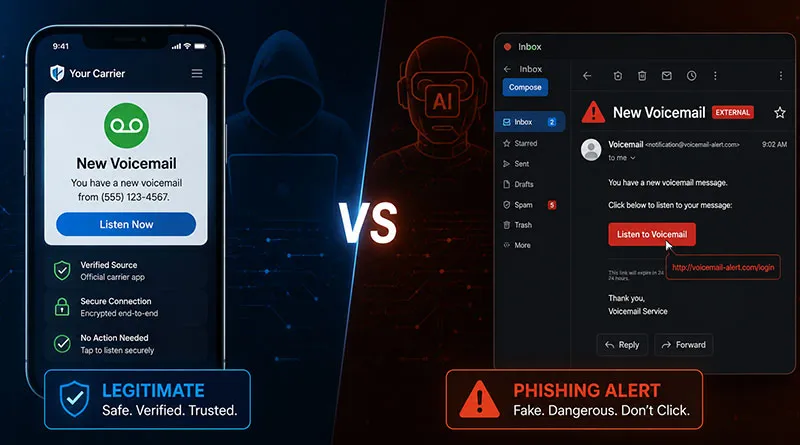
Cybercriminals are weaponizing voicemail notifications—and artificial intelligence is making their fake messages nearly impossible to distinguish from real ones.
Over the past seven days, multiple cybersecurity firms have issued urgent warnings about a dramatic spike in voicemail phishing scams, also known as “vishing” (voice phishing) or “scam-mail.” These attacks don’t just target your voicemail box—they target your inbox, your login credentials, and your device security.
Key Points:
- Voicemail phishing scams are surging, fueled by AI-generated fake emails
- Attackers send fake “missed call” or “new voicemail” emails with malicious links
- AI makes scams harder to spot (no typos, realistic logos)
- Red flags: generic greetings, urgency, mismatched URLs, weird attachments
- Never click links in voicemail emails — use your carrier app or phone dialer instead
- T-Mobile now offers “verified voicemail” badges; others coming by Q3 2026
How the Scam Works
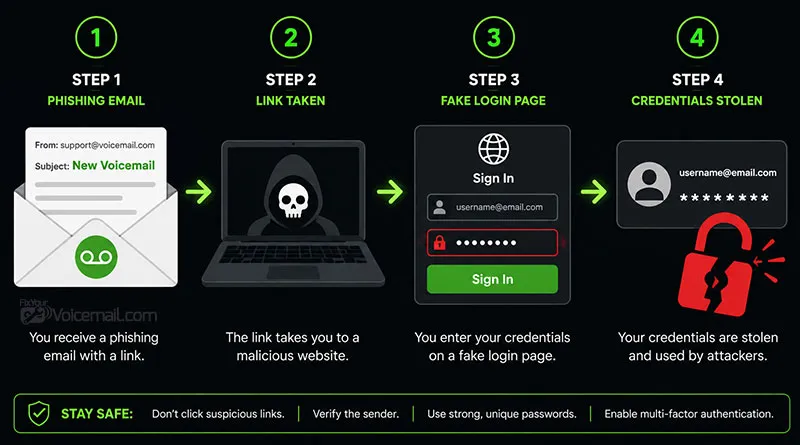
The new wave of attacks follows a deceptively simple pattern:
- You receive an email with a subject line like:
- “You have 1 new voicemail from [Unknown Number]”
- “Missed Call Notification — Action Required”
- “Voicemail transcript attached”
- The email appears legitimate — complete with fake carrier logos, spoofed sender addresses, and AI-generated text that mimics your provider’s typical language.
- A link or attachment invites you to “play your voicemail” or “log in to hear your message.”
- Clicking leads to danger: malware installation, credential-harvesting login pages, or direct payload delivery.
Why Voicemail? Why Now?
Voicemail notifications occupy a strange trust zone. Most people expect voicemail alerts, rarely scrutinize them, and are conditioned to click quickly in case the message is urgent from a boss, doctor, or family member.
Attackers are exploiting that conditioned trust.
According to a mid-May 2026 alert from the Federal Trade Commission (FTC), reports of voicemail-themed phishing have increased 210% since January, with a pronounced surge in the last 7–10 days.
Real-World Indicators to Watch For
Security experts urge users to look for these telltale signs:
| Suspicious Signal | What to Check |
|---|---|
| Generic greeting | “Dear user” instead of your name |
| Urgency language | “Respond immediately” or “Your mailbox will be locked” |
| Mismatched URLs | Hover over any link—does it go to your actual carrier? |
| Unexpected attachments | Legitimate voicemails rarely arrive as .zip, .exe, or .docm files |
| Sender domain | @rnicrosoft.com instead of @microsoft.com — one character off |
How to Protect Yourself
- Never click links in voicemail notification emails. Instead, open your carrier’s official app or dial your voicemail directly.
- Enable visual voicemail through your provider’s app (e.g., T-Mobile Visual Voicemail, Verizon Voicemail, or Google Phone’s built-in visual voicemail). These bypass email entirely.
- Use your phone’s native voicemail tab — On iPhones (Phone app > Voicemail) and Android (Phone app > Voicemail), messages appear without external links.
- Report suspicious emails to your IT department or forward them to the Anti-Phishing Working Group at reportphishing@apwg.org.
- Deploy DMARC/DKIM/SPF if you’re a business. These email authentication protocols make it harder for scammers to spoof your domain.
What Carriers Are Doing
Major carriers have begun rolling out branded voicemail indicators that confirm a message originated from their systems. T-Mobile announced this week that it will add a “verified voicemail” badge to legitimate email notifications. AT&T and Verizon are expected to follow suit by Q3 2026.
However, experts caution that scammers adapt quickly. No badge system is foolproof.
Read Also: Google Pixel’s ‘Take a Message’ Feature May Come to All Android Phones
Voicemail phishing scams are evolving faster than ever, fueled by AI-generated content that erases old warning signs.
In the last week alone, security firms have flagged thousands of fraudulent “missed call” emails designed to steal passwords, install malware, or compromise business networks.
The safest strategy remains simple: never click voicemail links inside emails. Always access your messages through your official carrier app or phone dialer. As attackers grow smarter, our strongest defense is a healthy dose of skepticism—even for something as routine as a voicemail alert.